For macOS · One-time purchase
Copy nine things.
Paste any of them.
MultiClipboard adds nine clipboard slots to your Mac. Save with ⇧⌘C, paste with ⇧⌘V. Your normal copy & paste stays exactly as it is.
Try it right here
A live demo, right in your browser.
Click a snippet, hit ⇧⌘C to save. Click the reply, hit ⇧⌘V, then press 1–9. Drag slots to reorder, ✕ to delete.
Snippets
Click one · then ⇧⌘C
Compose reply
Click here · then ⇧⌘V
Grab a Mac to try it live.
The interactive demo needs a physical keyboard. Scroll on for the video walkthrough.
⌘C has a memory of exactly one.
You copy the address. Then the order number. Then the address is gone. Back to the first tab, copy it again… Sound familiar? Your clipboard forgets everything the moment you copy something new. MultiClipboard remembers nine.
Save without thinking
One shortcut to remember
Select anything — text, images, files — and hit ⇧⌘C. A small confirmation appears, the copy lands in slot 1, and everything else shifts down. Newest is always №1. Zero mental bookkeeping.
Paste at the speed of keys
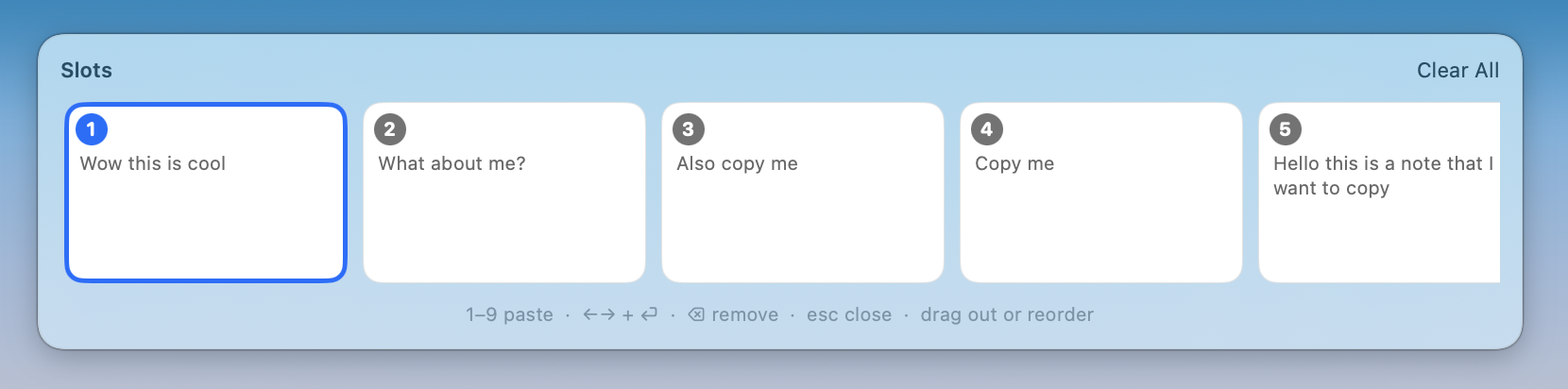
Your slots, one keystroke away
⇧⌘V summons the slot bar at the top of your screen. Tap 1–9 and it's pasted — into whatever app you were just using. Arrow keys and ⏎ work too. And your original clipboard? Restored automatically, like nothing happened.
Or just drag it
A clipboard you can see
Click the menu bar icon and your slots appear as visual cards — images show the actual image. Drag a card into any app. Drop an image on your desktop and it becomes a real file. Drag cards past each other to reorder.
Made for your Mac.
Native Swift
Not Electron. Instant, tiny (~1 MB), silent on your battery.
Private by design
No account. No cloud. Your clipboard never leaves your Mac.
Feels like macOS
System materials, SF Symbols, dark mode. Like Apple made it.
Works everywhere
Any app that can copy & paste. Text, rich text, images, files.
For everyone who copies more than one thing.
Developers
API key, token, snippet — all loaded at once.
Designers
Hex codes and assets without the tab dance.
Writers & marketers
Research quotes lined up, ready to place.
Support & sales
Canned answers on keys 1–9.
Simpler than a clipboard manager. Cheaper too.
| MultiClipboard | Paste | Pasty | |
|---|---|---|---|
| Price | $9 once | $29.99 per year | $24.99 per year |
| Learning curve | One shortcut | New workflow | New workflow |
| Account required | Never | Yes | No |
| Your data | Stays on your Mac | Cloud sync | On device |
| Winner |
Competitor prices as of July 2026.
One payment. Yours forever.
No subscription. Free updates. 14-day money-back guarantee.
🔥 10 of 10 early-bird licenses left
- Nine extra clipboard slots
- Slot bar + global shortcuts
- Drag & drop anything, anywhere
- Text, images & files
- Free updates, forever
- macOS 13+, Apple Silicon & Intel
Frequently asked
Stop re-copying things.
Nine slots. One shortcut. $9, once.
No subscription · Private · Native · 14-day money back